Visualizzazione post con etichetta remote shutter. Mostra tutti i post

giovedì 24 maggio 2012

BT Remote Shooter 1.0: Bluetooth Control cameras for Android


After the completion of Remote Shooter 1.0, the solution for remote control shooting of digital cameras with features Time Lapse and events, we transfer the GUI and its functions on devices using the Android App Inventor.

NEW:
 tested on:
Nikon Coolpix AW100
Nikon D50
Canon Powershot A300
Canon Poweshot S500

The idea stems from the desire to experiment with on Android App Inventor and the practical need to expand the graphic interface of the Remote Shooter 1.0 to make it both easier and faster entry of parameters for Time Lapse or prospective role in the study.
If it is necessary to insert large intervals of time or number of shots, we realized that it could be difficult and perhaps even tedious, use only the up / down on the board.
For those unfamiliar with the project Remote Shooter 1.0, is essentially a sophisticated remote control for remote shooting (but not only) digital camera via USB, in fact, many models of compact and DSLR cameras, Nikon and Canon, for example, are compatible PTP mode with the USB PIC-AP-BOARD (PIC Auto Programming Board) and the firmware RemShoot 1.0 (Remote Shooter).
The ability to remotely activate many functions (first click) on digital cameras, makes it possible to take pictures sometimes impossible or at least difficult to achieve with the traditional method because of human reaction times.
The PTP and applications in photography.
Most digital cameras to provide medium-high level command set PTP for their remote control, or simply to transfer images to a PC.
Using the appropriate commands and properties the photo enthusiast can:
1) remotely the shutter button (shutter),
2) Make an Interval (Time Lapse)
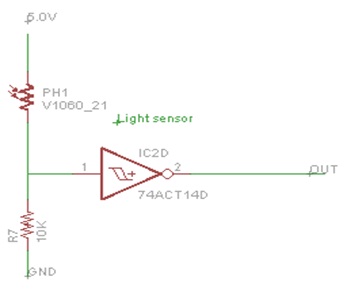
3) Take pictures automatically based on events detected by sensors of light and sound.
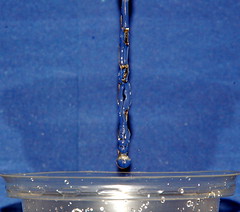
Making jerky in the world of high speed photography '(a falling drop of water or other liquid, explosion of balloons etc) or take shots at regular intervals (even hours) while Time Lapse (eg to record the blossoming of a flower or the hatching of an egg) and 'easily achieved by combining this system with appropriate sensors, motion, light or sound.
To check if your camera can be controlled by RemShoot RemShoot BT 1.0 or 1.0 you should run the test compatibility with your application for windows (XP and Seven):
http://goo.gl/2BVMg
Once you extract the download, run the executable and follow the instructions PTPControlCheck.exe.
Interesting feature is that RemShoot BT 1.0 Firmware is upgradeable via a USB stick.

If you are interested in Remote Shooter assembled and tested, with LCD display, you can find it on Ebay Italy (BT Module not included)


examples:

My Portfolio on flickr.com

Read more

giovedì 29 marzo 2012

Remote Shooter 1.0: USB remote control system for cameras


 Modern digital cameras not only use the USB port to transfer images to PC (USB Mass Storage), but also to receive specific control commands that control certain functions (USB PTP). 
 Based on the prototype presented on http://glptech.blogspot.it/2011/12/controlling-digital-camera-via-usb-port.html
 Remote Shooter 1.0 is the complete solution for remote control shooting with Time Lapse functions and events.
Many models of compact and DSLR cameras, Nikon and Canon in particular, are compatible with the USB PIC-AP-BOARD (PIC Auto Programming Board) and the firmware RemShoot 1.0 (Remote Shooter)
 The ability to remotely activate many functions (but especially the shot) on digital cameras give the opportunity of take pictures that sometimes  is manually impossible or at least difficult to achieve with the traditional method because of human reaction times.

NEW:
 tested on:
Nikon Coolpix AW100
Nikon D50
Canon Powershot A300
Canon Poweshot S500

 PTP and applications in photography. 
The PTP commands more interesting to implement for the photo enthusiast are: 
1) Remoting the shutter button (shutter),

2) Interval (Time Lapse) 

3) Set / read values ​​of shutter speed, aperture, etc..

4) Shutter controlled by light sensors and sound reacting to external events
 Making jerky in the world of high speed photography (a falling drop of water or other liquid, explosion of balloons etc) or take shots at regular intervals (even hours) while Time Lapse (eg to record the blossoming of a flower or the hatching of an egg) is easily achieved by combining this system with appropriate sensors, motion, light or sound. 

5) Bracketing (for cameras that provide the function) to make postelaborazioni in HDR. For those not aware, the bracketing feature (usually found on DSLR) cameras in the shows "varied exposure to fork", this includes the performance of at least 3 photos in succession separated by a value of over-and underexposure (longer and shorter than expected) that allows you to "hit" the perfect photo or obtain special software with a special effect (HDR, High Dynamic Range) superimposing the three images. 

The firmware Remshoot 1.0
RemShoot 1.0 handles the shooting of pictures  simultaneously in two different ways:
    1) Through PTP, using the camera's USB connection and remotely shooting.
    2) Using a command pin to safety trigger an external flash. (recommended use of the camera in bulb mode and in darkened environment)

For shots in high speed, as fast, the USB protocol in some cases may not be qualified.
The functions currently available are:
    1) Remoting the shutter button (shutter),

Warning: the remote cord used is that provided for the Generic PTP, used by most compact and DSLR cameras that claim to support the PTP protocol and remote control.

    2) Interval (Time Lapse)
        parameters:

     firing frequency, in seconds
     number of shots

    3) Shutter controlled by light sensors and sound reacting to external events.
        parameters:

     sensor enabled / disabled
     delay in microseconds (necessary in order to synchronize the best shooting with the position of the moving object intercepted by the sensor used)


Compatibility 
To check if your camera can be controlled by RemShoot 1.0 is recommended that you download the application compatibility testing for Windows (XP and Seven):   http://goo.gl/2BVMg

        Fast link
http://goo.gl/2BVMg


Once you have downloaded it,  extract the files, connect your camera to a USB port of your PC (make sure to set PTP mode, NOT Mass Storage Mode), PTPControlCheck.exe run the executable and follow the instructions.

USB PTP 1.0 P&M Lab 2012
The USB PIC-AP-board ready for use, programmed with the firmware RemShoot 1.0.


The philosophy that inspired the PIC-AP-BOARD project:

Invent
: Create your own project

Develop
: Develop and test on-board PIC-AP Board

Use
: complete it and use the same board PIC-AP-Board for your target project.


After several years of testing on development boards more or less evolved (from Microchip products Pic18 to PIC32), we realized that we needed a board of our own and be more self-sufficient as possible, easily powered, equipped with lcd display and keys, and the right number of pin I / O available, first of all capable of selfprogramming without use of external programmers, on which to develop a project more or less complex, which once consolidated revolved on the same board without other passages, but whose firmware be easily updated by anyone.

 
Using the USB PIC-AP-board for various uses

The USB PIC-AP-Board even if they already came with firmware 1.0 RemShoot for controlling a digital camera, can, thanks to its power to function (USB, I2C, SPI, ADC, Timers, PWM, UART, etc.), memory and expandability to be used for purposes other than photography.
The fact sheet can be connected via USB to a PC is powered by independent power supplied from the PC (USB device self-powered or bus powered) thus allowing a wide variety of uses, of course with the right firmware that can be modified by the particular USB boot loader used for updating, thus allowing you to program the card with a simple USB stick with no specific type of programmer for PIC, in each case by the most experienced programmers can also be programmed via ICSP.

To show the great  flexibility of the board we are working to complete other projects that we'll publish for fans of Electronica Open Source Blog, dedicated to the use of graphic displays, or even to connect wireless or wired with PC and Smartphone devices and Android in general, using different categories of sensors or the ability to control external equipment.


Technical specification of USB PIC-AP-BOARD

Schema a blocchi

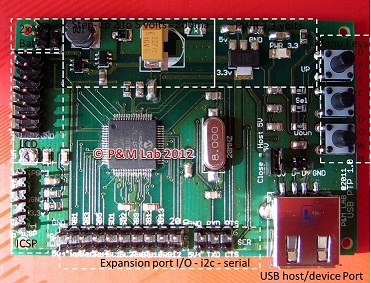
USB PIC-AP-BOARD : Functional blocks.


The board is built in large part to make it compact SMD (5x7 cm) and easily portable, in addition to the LCD, need to work only 2 AA batteries 1.5 V AA

USB PIC-AP-BOARD
Microcontroller: PIC24FJ256GB106

      1x USB Host / Device (Bus Powered or Self-Powered)
      1x USB MODE jumper
      1x 14-pin LCD connector
      1x 8x2 LCD DISPLAY
      3x Buttons
      16 Input / Output pins and power (5V and 3.3V)
      2x I2C port
      1x serial port
      1x Power LED
      1x ICSP connector for Debug / Program
      Power: 3V with 2 AA batteries 1.5 V
 
The DC-DC converter provides high efficiency at 3.3V and 5V voltages required to power the card, USB devices and any external circuits connected to the expansion connectors

The kit RemShoot 1.0

 For those interested in the solution and tested, ready for use, the kit consists of:

1) Card 1x USB PIC-AP-board mounted, tested and loaded firmware RemShoot1.0 (upgradable)

2) 1x LCD 8x2

3) User Manual supplied with the wiring diagram and pin configuration of port expansion

4) File Gerber board design USB PIC-AP-BOARD

5) File. Hex bootloader USB Adapter-specific for USB PIC-AP-BOARD

6) File. Hex firmware 1.0 RemShoot

Remarkable that with its  USB Host
bootloader, the board can be reprogrammed or updated all through a simple USB key dongle without using any kind of programmers.

For projects we recommend the use of tools like Microchip MPLAB and Microchip C30 compiler, you compile the project, copy the file. Hex on the USB stick once connected to the
PIC-AP-BOARD, program itself in seconds.
Example of a light detector joint with a laser beam


 Shoots remotely controlled by a laser beam


A shoot remotely controlled by a sound trigger


Read more on EMCelettronica Open Source(sorry, is in Italian)

For electronics enthusiasts and DIY Remote Shooter, the project documentation is available at only 9 euros. You can make it yourself (do-it-yourself) by downloading the documentation (schematic, wiring diagram, parts list, assembly plan, gerber files, executable code) from the site  EMCelettronica Open Source.   Download

If you are interested in Remote Shooter assembled and tested, with LCD display, you can find it on Ebay Italy


For every doubt contact me at gianluigi.perrella@gmail.com

mercoledì 21 marzo 2012

Remote Shooter 1.0: sistema di controllo remoto USB per macchine fotografiche


Da diverso tempo le moderne fotocamere digitali possono utilizzare la porta USB non solo per trasferire immagini al PC (USB Mass Storage) , ma anche per ricevere specifici comandi di controllo che ne controllano alcune funzioni (USB PTP). Remote Shooter 1.0 è la soluzione completa per il controllo remoto dello scatto con funzioni di Time Lapse e ad eventi
Molti modelli di compatte e  DSLR, Nikon e Canon in particolare, sono compatibili con la scheda USB PIC-AP-BOARD (PIC Auto Programming Board) ed il firmware RemShoot 1.0 (Remote Shooter)
La possibilità di attivare remotamente molte funzioni (ma in particolare lo scatto) sulle macchine fotografiche digitali rende possibile realizzare fotografie a volte impossibili o almeno difficili da realizzare con il metodo tradizionale a causa dei tempi di reazione umani.

Protocollo PTP e applicazioni nella fotografia.
I  comandi PTP piu’ interessanti da implementare per l’appassionato di fotografia sono:
1) Remotizzazione del pulsante di scatto (shutter),
2) Intervallometro (Time Lapse)
3) Impostazione/lettura dei valori tempi di scatto, apertura diaframma etc.
4) Scatto comandato da sensori di luce e suono in base ad eventi esterni
Fare scatti nel mondo della fotografia ad alta velocita’ (caduta di una goccia d’acqua o altro liquido, esplosioni di palloncini etc) o fare scatti a intervalli regolari (anche di molte ore) con la funzione Time Lapse (ad esempio per registrare lo sbocciare di un fiore o lo schiudersi di un uovo) e’ facilmente realizzabile abbinando a questo sistema opportuni sensori di movimento, luce o suono.
5) Bracketing (per le fotocamere che ne prevedono la funzione) per effettuare postelaborazioni in tecnica HDR. Per chi non fosse a conoscenza, la funzione Bracketing (in genere si trova sulle DSLR) nelle macchine fotografiche indica la "esposizione variata a forcella", questa prevede l'esecuzione di almeno 3 foto in successione separate tra loro da un valore di sovra e sottoesposizione (tempo più lungo e più corto del previsto) che permette di "centrare" la foto perfetta o di ottenere con speciali software un effetto particolare (HDR, High Dynamic Range) sovrapponendo le tre foto.

NEW:
 tested on:
Nikon Coolpix AW100
Nikon D50
Canon Powershot A300
Canon Poweshot S500

Per verificare se la tua fotocamera può essere controllata da RemShoot 1.0 si consiglia di eseguire il test di compatibilità scaricando l’applicazione per windows (XP e Seven):

http://goo.gl/2BVMg

Una volta effettuato il download estraete il file, collegate la vostra macchina fotografica ad una porta USB del vostro PC, (assicuratevi di impostare PTP Mode e non Mass Storage), lanciate l’eseguibile PTPControlCheck.exe e seguite le istruzioni.

La scheda USB PIC-AP-BOARD pronta all'uso, corredata del firmware RemShoot 1.0
USB PTP 1.0 P&M Lab 2012


La filosofia con la quale nasce la PIC-AP-BOARD:

Invent:  Crea il tuo progetto
Develop: Sviluppalo e testalo sulla scheda PIC-AP-BOARD
Use: Completalo e usa la stessa scheda PIC-AP-BOARD per il tuo progetto finito.

Se ti interessa Remote Shooter montato e collaudato, completo di display, puoi trovarlo su Ebay Italia

Leggi tutto su EMCelettronica Open Source